 Bullhorn Text
Text your whole group in one click. From your own number.
For pastors, coaches and anyone who sends the same reminder to 10 or more people. Everyone gets their own text, with their name in it, from you. Then you see exactly who got it.
- First group text in about 5 minutes
- No group thread, no reply-all storm
- One payment. No monthly bill, ever.
DAYSMoney-back guarantee.
No questions asked.
What you need
Right now you have three bad options.
Every week: one reminder, sixty people. Here's what that usually costs you.
Or: write it once, click Send, go make dinner.
Add your people
Search your Mac's Contacts, upload a spreadsheet, or paste names and numbers.
Write it once
Type (name) where their first name goes. Bullhorn checks your writing before anything goes out.
Click Send
Everyone gets their own text from your number. Replies come back to you, one on one.
Your week, before and after
38 seconds: from copy-and-paste at the kitchen table to one click, and everyone gets their own text.
The story scenes are made with AI. Every app screen is the real Bullhorn Text.
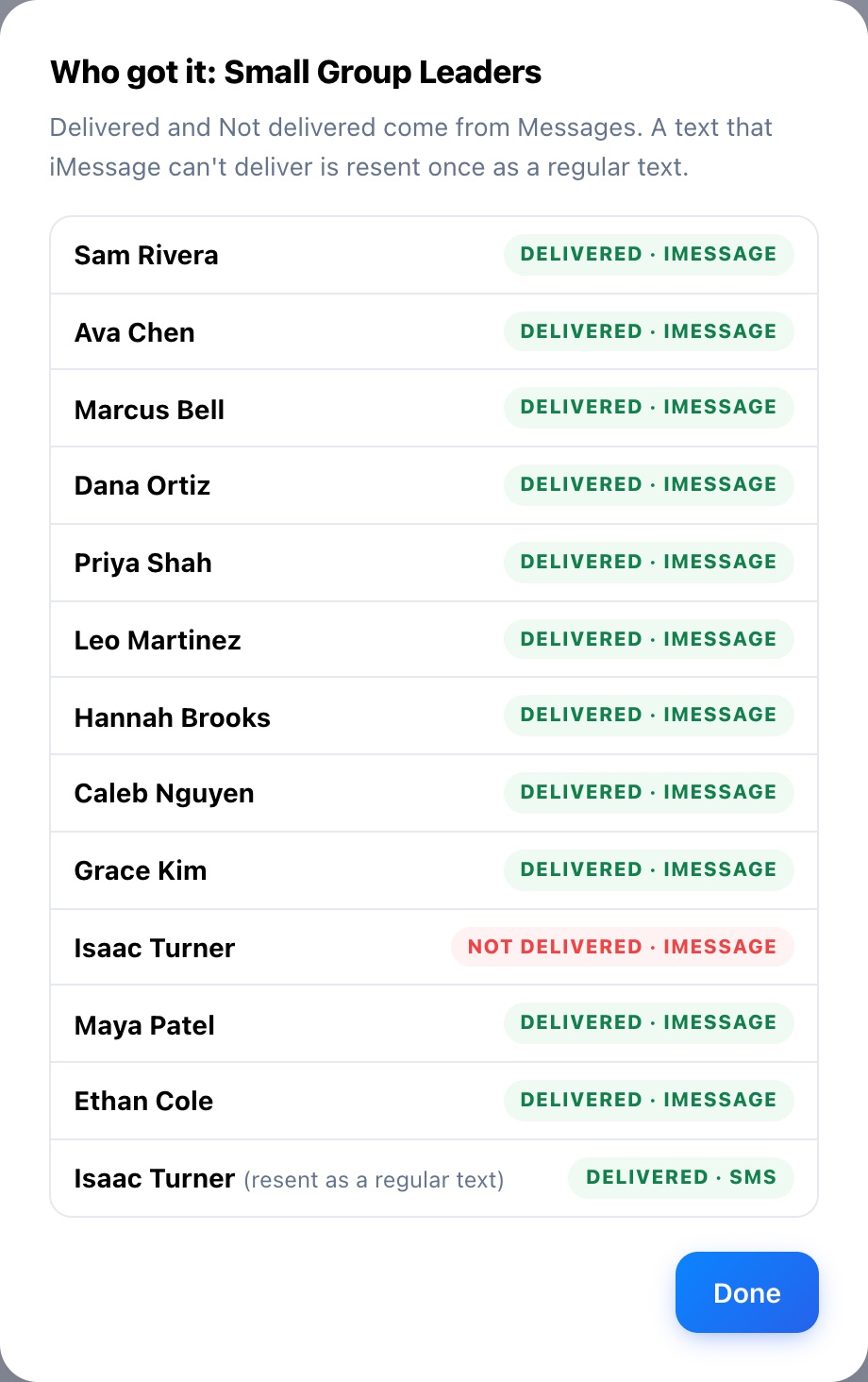
Know everyone got the message.
History shows, person by person, whose text was delivered. If iMessage can't reach someone, Bullhorn resends it as a regular text. Anyone still missed? One click retries just them.
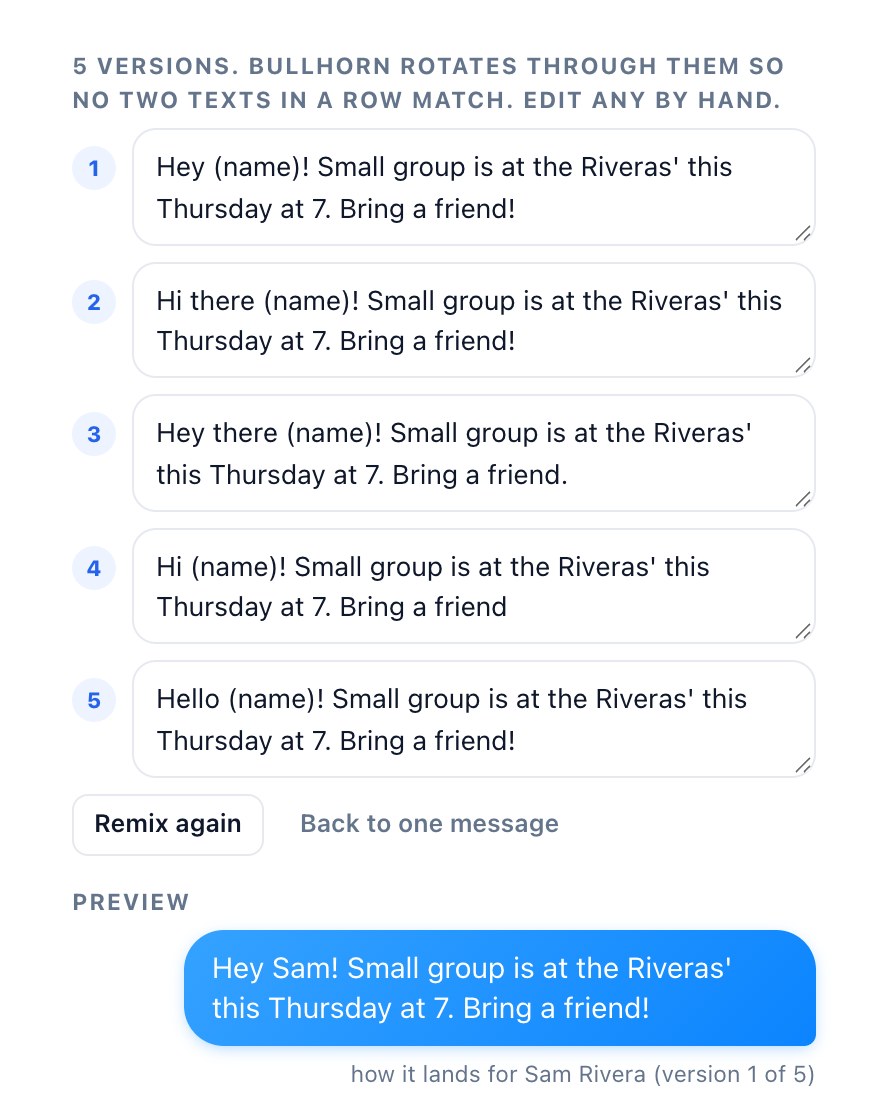
Sixty texts that don't read like a robot.
One click turns your message into five natural versions, and Bullhorn rotates them so no two texts in a row match. Edit any of them by hand, then preview exactly what Sam will see.
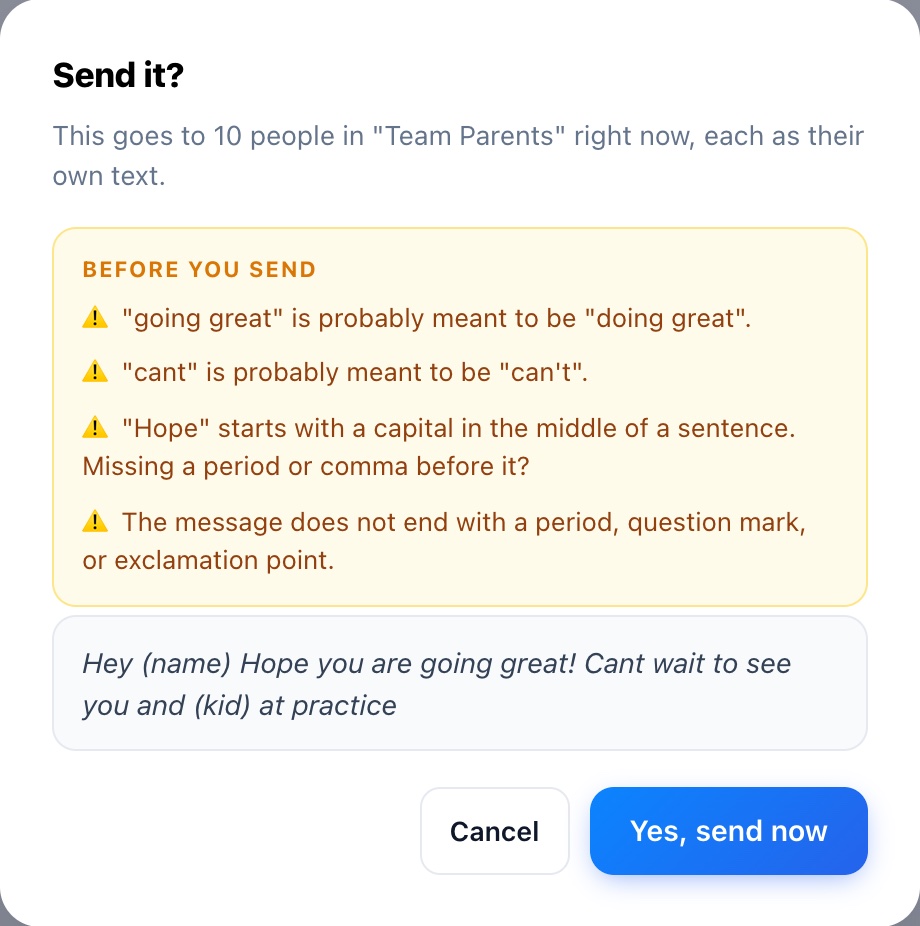
Catches the typo before 60 parents see it.
Spellcheck misses the mistakes that embarrass us, because every word is spelled right. Bullhorn reads for the real ones:
- "going great" when you meant "doing great"
- "cant" missing its apostrophe
- a name column that's blank for someone
- a missing period, or a stray capital mid-sentence
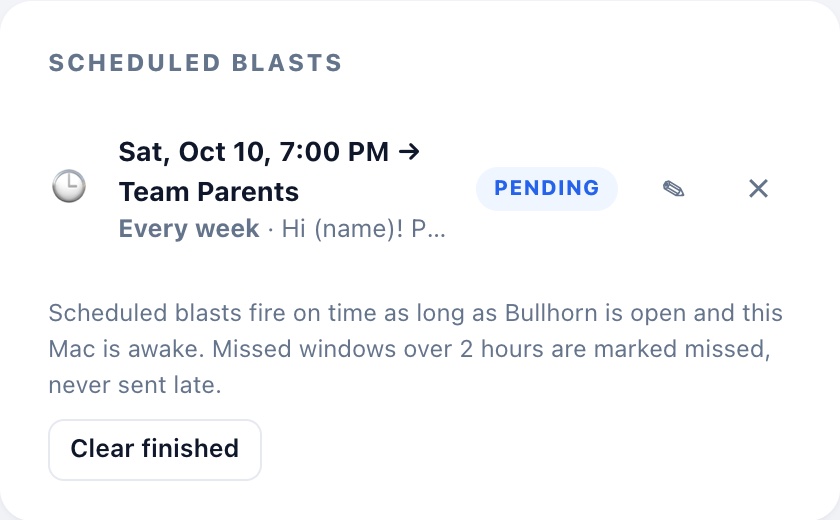
"Every Saturday at 7 PM" goes out on its own.
Schedule any message for later, or repeat it every day, week, two weeks or month. Quiet hours hold anything that would land at night until morning.
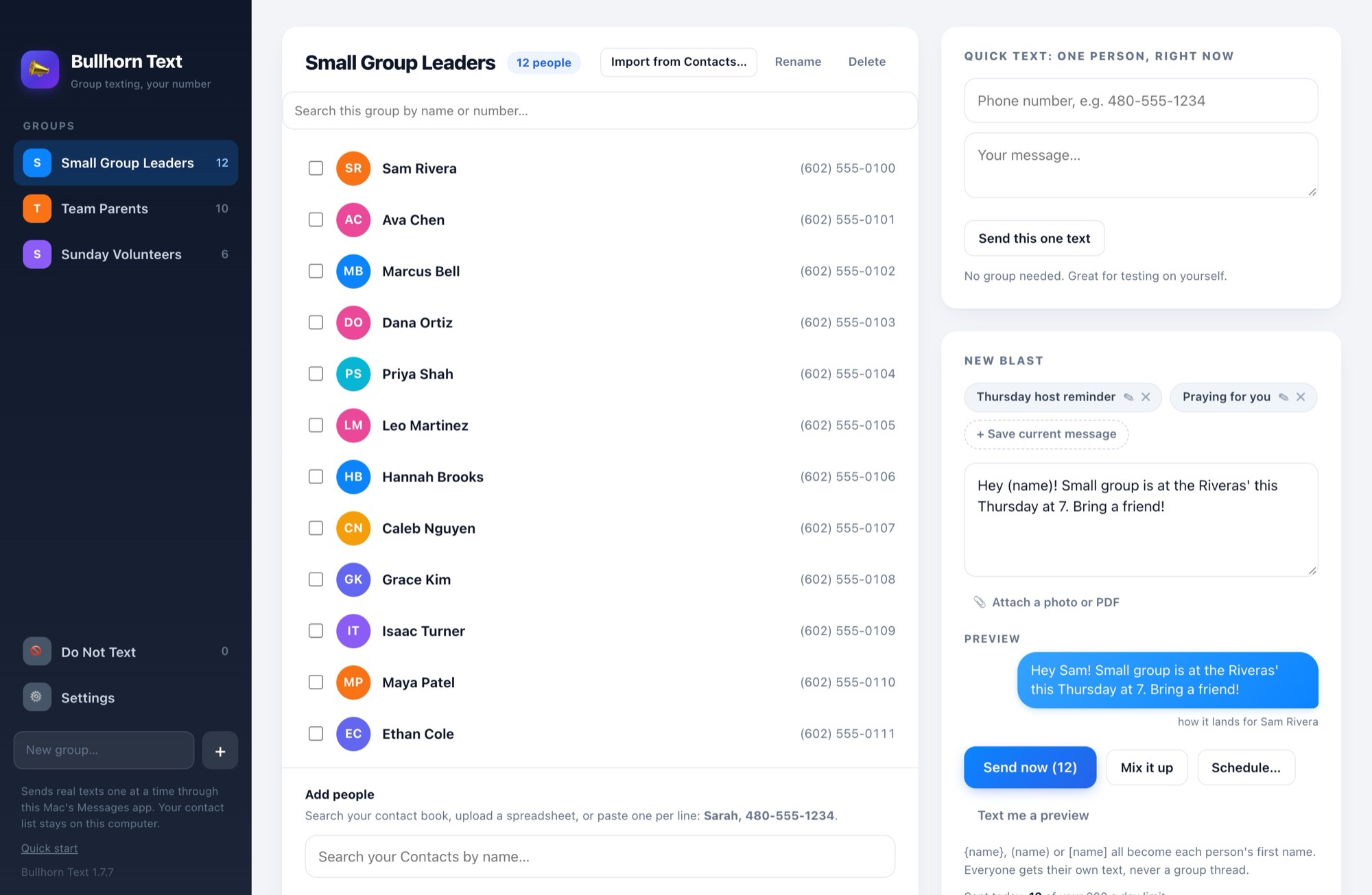
All in one window on your Mac
Your groups on the left, your people in the middle, your message on the right.
Their name, and more
Upload a spreadsheet with a "kid" column and write "See you and (kid) at practice." Each parent gets their own child's name.
Photos and PDFs
Attach the flyer, the map or the schedule, and it follows each person's text.
Text me a preview
See the exact text the first person will get, on your own phone, before anyone else does.
Paced like a person
A few seconds between texts and a daily limit you set, so your sending looks like you, because it is you.
Do Not Text list
Someone asks you to stop? One click and Bullhorn skips them in every group until you say otherwise.
Your list stays on your Mac
No cloud, no account, nothing uploaded. Your contacts are encrypted on your computer.
From people using it
Three years of texting, side by side
The cheapest plan from each, kept for three years. Prices from each company's own pricing page or App Store listing, checked October 2026.
See the full comparison (features, fine print and when another tool is the better fit)
Everything, for one payment
Founding price for the first 100 buyers, then $147.
DAYS30 days, no questions. Not for you, for any reason? Email us and get every cent back.
Have a code?
Secure checkout by Stripe. Sales tax included. Your license key arrives by email in about a minute. Questions before you buy? Ask us.
Is it for you?
Made for people who already know your name
- Pastors, youth pastors and small-group leaders
- Coaches and team parents
- Volunteer coordinators, scout leaders, club organizers
- Small business owners texting their own customers
Not for marketing lists, and not for Windows
Bullhorn Text runs on a Mac and sends from your personal number through Apple's Messages. It's built for texting people who know you and expect to hear from you. Buying lists or texting strangers breaks Apple's rules and US texting law, and it will get your number flagged. Please don't.
Questions
What do I need?
A Mac running macOS 12 or newer, with the Messages app signed in to your Apple ID. Bullhorn Text drives Messages for you, so texts come from your number. It doesn't run on Windows, iPad or Android.
Do I need an iPhone?
Not to text iPhones: those go out as blue iMessages straight from your Mac. To reach Android phones, your iPhone passes them along as regular green texts. Turn on Text Message Forwarding once (iPhone Settings, then Messages, then Text Message Forwarding, then your Mac).
How long does setup take?
About 5 minutes: download, paste your key, text yourself a test, then make your first group from Contacts or a spreadsheet. The app walks you through each step.
How many people can I text?
As many as you like, but Apple can pause heavy senders. Around 200 texts a day is a safe ceiling, and Bullhorn Text helps you stay under the daily limit you set.
Will I know if someone didn't get it?
Yes. History shows who each text was delivered to. If iMessage can't reach someone, Bullhorn resends it once as a regular text, and you can retry anyone still missed in one click. (This reads delivery status from Messages, which needs a one-time Mac permission the app walks you through.)
Is my contact list uploaded anywhere?
No. There is no Bullhorn Text account and no cloud. Your groups live on your Mac, encrypted, and the app talks only to your Messages and Contacts apps. Two small exceptions, neither about your contacts or messages: once a day it asks our website whether a newer version exists, and when you first enter your key on a Mac it checks the key with us so it can be used on up to 3 Macs.
What if my Mac is asleep when a scheduled text is due?
Bullhorn Text sends on time as long as it's open and your Mac is awake. You can have it open automatically when your Mac starts. If a send is more than two hours late, it's marked missed instead of going out at a strange hour.
Can I use it on more than one Mac?
Yes. One key works on up to 3 Macs you own, like a desktop and a laptop. Buying for a staff or a team? Email [email protected] and we'll set you up.
Lost your key or got a new Mac?
Go to bullhorntext.com/my-key and type the email you bought with. We'll send you a link to your key, where you can also remove an old Mac to make room for a new one.
How do updates work?
Every update is free. When one is ready, the app shows a bar at the top: click Install update, then Restart. Your groups and settings stay just as they are.
What will my card statement say?
LINK.COM* BULLHORNTEXT. Checkout is run by Stripe's Link, which handles payment, sales tax and receipts for us. Your receipt comes from Link too.
How does the friend code work?
Every buyer gets a personal code. Anyone who uses it saves $20. You get $20 for each one, with no limit: what you paid comes back to your card first, automatically, and after that we pay you monthly by PayPal or Venmo. Got it free with a promo code? You still get a code and still earn $20 for every friend who buys. See the referral terms.
How do refunds work?
Email [email protected] within 30 days, for any reason, and you get every cent back. See the refund policy.
Who makes this?
A small team that texts groups of people every week ourselves. We built Bullhorn Text because we wanted personal texts, from our own numbers, without a monthly bill or tapping Send a hundred times. Reply to any of our emails and a real person on the team reads it.
Still have a question? Ask us and a real person on the team will reply, usually within a day.
Your people are waiting to hear from you.
One payment. Your number. Their name in every text. On your Mac in 5 minutes.
DAYSMoney-back guarantee.
No questions asked.